Start 2011 off right with some cheap web hosting that'll help save the planet.
For less than $5 a month you can help sustain renewable energy. FREE DOMAIN FOR LIFE! UNLIMITED WEBSPACE!
At your finger tips here:
http://www.greengeeks.com/
For other great cheap web hosting option visit
THE TOP QUALITY WEB HOSTING SERVICES
Sunday, January 2, 2011


Thursday, November 11, 2010
Death of the desktop PC
Your walking to work and you reach into your pocket retrieving a small device not much bigger than a cell phone. Its flexible and transparent much like the inner window of an airplane. The device sits perfectly in your hand. You notice how well the little weight it has balances in your palm without gripping the device. You remember dropping it yesterday causing a noticeable abrasion on the screen but today there doesn't appear to be any damage. As you slide the device open with your thumb, a 3 dimensional display unfolds like a fan from the center of the screen. It hovers at a 30 degree angle just an inch or so below your thumb. In the center is an enticing illuminated floating orb. It resembles your favorite piece of fruit. You peel away a section of its outer layer revealing an item called "Transit tool". You lift the device just above head level centering the transparent panel on a sign marked "Transit assist". The device recognizes what bus your waiting for then says to you "the 15 downtown will arrive in 7min". There are several other buttons situated along this display just below the orb; their purpose changing as you peel away different sections of the orb. The functionality in each layer comprises everything from entertainment and recreation to safety and self enrichment. You marvel at the fact that you could schedule a doctors appointment, pay for a candy bar without going to the register, and run a diagnostic check on your car's fluids and tires in a matter of seconds with just a few flicks of your thumb.
After a short bus ride you arrive at your desk and place your device in a dock. The orb grows legs and arms, waves good bye, and hops off the device disseminating in a burst of white particles. You do a 180 in your chair to face a rather large surreal holographic image of a Dali painting in motion. The small glowing orb in cartoon like fashion leaps into view and the painting slowly fades away. After a moment of jazz hands (and a rather adorable "tada!") the orb (whom you've affectionately named Harry) retracts its little arms and legs returning to an inanimate state awaiting its next instruction.
It sounds like the works of science fiction but the technologies I describe here are very real, and in the not so far off future, will reinvent the computers we live and work with. Breakthroughs in Nanoscience, cloud computing, and even Holographics! are bringing some exciting changes to hardware components, software environments, and overall sex appeal of consumer electronics. By the end of the next 2 decades we may witness the death of the desktop PC; a device that is relatively unchanged in appearance for the last 15 years.
Nanoscience, a field of study credited for such innovations as self-repairing materials, nano storage, and carbon nanotubes, is giving engineers new frontiers to explore for product design. Scientists are already racing to replace silicon components with ultra-light, incredibly strong, and highly conductive materials. Materials produced from nanotechnology are perfect replacements for silicon based circuit boards. Graphene, a nobel prize winning material revolutionizes the 3 proponents for computing: data storage, transistors, and energy storage. Imagine computers so small they could fit into your contact lenses or on the head of a pin.
Cloud computing will one day allow people like you and me to run Mac, windows, Linux, your tivo, your microwave, your car, your tooth brush, and flush your toilet all from one device. A good way to think of the "cloud of the future" is to imagine web pages you visit as fully functional desktop PC's. Each web page is a customizable computer with all the processing power several of todays computers. You have access to thousands of application and and software environments all through a device the size of an iPhone. With a combination of a technique called Virtualization and the cloud, displaying and submitting information are the only roles your computer is tasked with. The processing, storage, and handling of said information will be performed over an internet connection; stored in a dust free, super cooled, climate controlled data warehouse hundreds of miles away. The cloud will remove the need for many of the physical and software components that burden people like you an me with things like component damage, Operating system failure, and Virus infection.
Putting the final nail in the desktop PC coffin is Interactive Holographics. Interactive Holographics is the next big frontier interactivity and perhaps the biggest technological challenge faced by engineers today. A group of researchers from the University of Arizona have announced a recent project allowing holographic images to be quickly written and rewritten to a single digital medium. Researchers also stated during an interview after the conference that in the next 15 years holographic televisions for the general public are a feasible reality. Another recent invention worth mentioning (and more closely related to the device in the introduction) is this lovely piece of touchable holography. Both these beasts are still decades away from true holography but just 5 years ago this wasn't even possible.
Be sure to click the links for more info.
After a short bus ride you arrive at your desk and place your device in a dock. The orb grows legs and arms, waves good bye, and hops off the device disseminating in a burst of white particles. You do a 180 in your chair to face a rather large surreal holographic image of a Dali painting in motion. The small glowing orb in cartoon like fashion leaps into view and the painting slowly fades away. After a moment of jazz hands (and a rather adorable "tada!") the orb (whom you've affectionately named Harry) retracts its little arms and legs returning to an inanimate state awaiting its next instruction.
It sounds like the works of science fiction but the technologies I describe here are very real, and in the not so far off future, will reinvent the computers we live and work with. Breakthroughs in Nanoscience, cloud computing, and even Holographics! are bringing some exciting changes to hardware components, software environments, and overall sex appeal of consumer electronics. By the end of the next 2 decades we may witness the death of the desktop PC; a device that is relatively unchanged in appearance for the last 15 years.
Nanoscience, a field of study credited for such innovations as self-repairing materials, nano storage, and carbon nanotubes, is giving engineers new frontiers to explore for product design. Scientists are already racing to replace silicon components with ultra-light, incredibly strong, and highly conductive materials. Materials produced from nanotechnology are perfect replacements for silicon based circuit boards. Graphene, a nobel prize winning material revolutionizes the 3 proponents for computing: data storage, transistors, and energy storage. Imagine computers so small they could fit into your contact lenses or on the head of a pin.
Cloud computing will one day allow people like you and me to run Mac, windows, Linux, your tivo, your microwave, your car, your tooth brush, and flush your toilet all from one device. A good way to think of the "cloud of the future" is to imagine web pages you visit as fully functional desktop PC's. Each web page is a customizable computer with all the processing power several of todays computers. You have access to thousands of application and and software environments all through a device the size of an iPhone. With a combination of a technique called Virtualization and the cloud, displaying and submitting information are the only roles your computer is tasked with. The processing, storage, and handling of said information will be performed over an internet connection; stored in a dust free, super cooled, climate controlled data warehouse hundreds of miles away. The cloud will remove the need for many of the physical and software components that burden people like you an me with things like component damage, Operating system failure, and Virus infection.
Putting the final nail in the desktop PC coffin is Interactive Holographics. Interactive Holographics is the next big frontier interactivity and perhaps the biggest technological challenge faced by engineers today. A group of researchers from the University of Arizona have announced a recent project allowing holographic images to be quickly written and rewritten to a single digital medium. Researchers also stated during an interview after the conference that in the next 15 years holographic televisions for the general public are a feasible reality. Another recent invention worth mentioning (and more closely related to the device in the introduction) is this lovely piece of touchable holography. Both these beasts are still decades away from true holography but just 5 years ago this wasn't even possible.
Be sure to click the links for more info.
Saturday, March 6, 2010
Mac Users: Getting around IMovie's limited Video formats
I recently discovered how limited IMovie is concerning video formats. I was shocked to find that one of the most successful movie editing programs for the OS X isn't capable of encoding a video in a very common format that, for example, YouTube requires as a usable video format. To get around this you can do one of two things for a Mac: Shell out $1000.0o for final cut pro, or download a freeware video conversion tool that is very easy to use and, well, free!
So what right?
Something I've never had the need to do but discovered is very effective at acquiring stock video footage, is using YouTube video downloading tools for finding clips of video material that I could splice into my videos. I've recently been tasks as part of a group project with creating a short movie that would spoof an MTV show called Pimp My Ride. As with every video project, time and budget constraints are a big issue and stock footage becomes a viable and, if done right, tasteful option.
Video clips that are not .mov (quicktime), or digital video format files will not work in IMovie. To get my stock footage clips I downloaded to work in Imovie, I used Isquint to encode my video clips in a format IMovie would understand. Although ISquint is a program that has been discontinued and is no longer for sale, its only a couple years old, works well, and is extremely easy to use.
Find several methods of downloading Youtube video here: CNet HowTo Download Youtube Video
Download Isquint here: http://www.versiontracker.com/dyn/moreinfo/macosx/28250
So what right?
Something I've never had the need to do but discovered is very effective at acquiring stock video footage, is using YouTube video downloading tools for finding clips of video material that I could splice into my videos. I've recently been tasks as part of a group project with creating a short movie that would spoof an MTV show called Pimp My Ride. As with every video project, time and budget constraints are a big issue and stock footage becomes a viable and, if done right, tasteful option.
Video clips that are not .mov (quicktime), or digital video format files will not work in IMovie. To get my stock footage clips I downloaded to work in Imovie, I used Isquint to encode my video clips in a format IMovie would understand. Although ISquint is a program that has been discontinued and is no longer for sale, its only a couple years old, works well, and is extremely easy to use.
Find several methods of downloading Youtube video here: CNet HowTo Download Youtube Video
Download Isquint here: http://www.versiontracker.com/dyn/moreinfo/macosx/28250
Wednesday, March 3, 2010
Improve your professional composure with a few tech savy phrases
An increasing number of non-technical related positions are requiring applicants have a familiarity with enterprise wide applications. Small businesses are also look for sharp young professionals adept at staying current with industry trends and innovative new markets. Since moving to the bay area 6 months ago I've been competing with thousands of talented young professionals for positions in Graphic Design, Marketing, Customer Service, Software Development, Tech Support, Food Service, General Laboring, Transportation and just about everything else. A great way I found to stand out in a sea of amazing was to mention a computing concept or two that could potentially save my prospective employer money.
Got an interview with a big company?
A new trend in many industries for rolling out enterprise wide applications is Cloud Computing. In a nutshell, Cloud Computing allows large companies to focus on developing quality applications rather than excessively spending money on equipment and teams of people to support them. The intended purpose of cloud computing was to create ways for employees to access applications securely from anywhere so long as they have an Internet connection. These web based applications have access to company wide resources allowing someone to perform large time consuming tasks efficiently without worry of backed up methods and data security. Currently, companies spend hundreds of thousands of dollars purchasing servers, software, and very expensive engineers. Cloud computing has eliminated the need for a company to locally house data centers.
If your applying for a large company and they ask you about what new ideas you can bring to the table, mention your "experience" with Cloud Computing applications and how much they enhanced the productivity with your previous company. Here is a list of companies providing Cloud Computing resources to companies world wide:
Salesforce.com (CRM)
Google (GOOG)
NetSuite (N)
Taleo (TLEO)
Concur Technologies (CNQR)
Info Technologies (IT)
If you'd like more info on Cloud Computing, you can go to http://www.salesforce.com/cloudcomputing/ for a breakdown and video.
Or here for a great article on new implementations:
http://gizmodo.com/5485804/ballmer-explains-the-cloud-in-5-easy-steps?skyline=true&s=i
Interviewing for a smaller business?
Small businesses are constantly looking for effective and cheap (if not free) ways to advertise their business making them more appealing and noticeable without the need for gimmicks or insane deals. This can often be a very tedious process of trial and error. Late last year I began outlining my own business blueprint and discovered a software category slowly emerging in popularity called Niche Market software.
Let's face it, Google has become a hub for getting information on product and service availability. If you need gardening equipment, perform a google search for gardening stores close by. If you're tired of the same old coffee shop, try something new via google. If your favorite store just moved locations, Gmap it! A business with 100% of their customers on the Internet now faces the challenge of climbing the search results ladder. A difficult task when the results are in the millions.
Niche Market Software helps a business decide how and what market to advertise in with the least amount of competition and highest amount of Google searches. By analyzing search terms related to your business, and the amount of business's that fall under each category, you can tailor your business's web page to use terms that will place your site higher on the Google search list. For instance, if I am setting up a t-shirt company I would probably avoid using search tags like "funny t-shirts" and "custom Tee's" for my website. I will undoubtedly be buried under my search competition. Since Google lists results by highest amount hits, a new business with little or no hits may never see the light of day. By finding a "Niche Market" rich with Googlers, relevant to my business, and little competition, I am sure to give my business the kindling it needs to attack larger markets. Niche Market software has a slew of features that are quite useful for achieving your marketing goals.
So, the next time you're interviewing for a small business, you can mention that Niche Market software was a great way your last manager had his/her marketing team compile data on the competition.
You can find a great piece of Niche Market Software @ http://www.marketsamurai.com/.
Got an interview with a big company?
A new trend in many industries for rolling out enterprise wide applications is Cloud Computing. In a nutshell, Cloud Computing allows large companies to focus on developing quality applications rather than excessively spending money on equipment and teams of people to support them. The intended purpose of cloud computing was to create ways for employees to access applications securely from anywhere so long as they have an Internet connection. These web based applications have access to company wide resources allowing someone to perform large time consuming tasks efficiently without worry of backed up methods and data security. Currently, companies spend hundreds of thousands of dollars purchasing servers, software, and very expensive engineers. Cloud computing has eliminated the need for a company to locally house data centers.
If your applying for a large company and they ask you about what new ideas you can bring to the table, mention your "experience" with Cloud Computing applications and how much they enhanced the productivity with your previous company. Here is a list of companies providing Cloud Computing resources to companies world wide:
Salesforce.com (CRM)
Google (GOOG)
NetSuite (N)
Taleo (TLEO)
Concur Technologies (CNQR)
Info Technologies (IT)
If you'd like more info on Cloud Computing, you can go to http://www.salesforce.com/cloudcomputing/ for a breakdown and video.
Or here for a great article on new implementations:
http://gizmodo.com/5485804/ballmer-explains-the-cloud-in-5-easy-steps?skyline=true&s=i
Interviewing for a smaller business?
Small businesses are constantly looking for effective and cheap (if not free) ways to advertise their business making them more appealing and noticeable without the need for gimmicks or insane deals. This can often be a very tedious process of trial and error. Late last year I began outlining my own business blueprint and discovered a software category slowly emerging in popularity called Niche Market software.
Let's face it, Google has become a hub for getting information on product and service availability. If you need gardening equipment, perform a google search for gardening stores close by. If you're tired of the same old coffee shop, try something new via google. If your favorite store just moved locations, Gmap it! A business with 100% of their customers on the Internet now faces the challenge of climbing the search results ladder. A difficult task when the results are in the millions.
Niche Market Software helps a business decide how and what market to advertise in with the least amount of competition and highest amount of Google searches. By analyzing search terms related to your business, and the amount of business's that fall under each category, you can tailor your business's web page to use terms that will place your site higher on the Google search list. For instance, if I am setting up a t-shirt company I would probably avoid using search tags like "funny t-shirts" and "custom Tee's" for my website. I will undoubtedly be buried under my search competition. Since Google lists results by highest amount hits, a new business with little or no hits may never see the light of day. By finding a "Niche Market" rich with Googlers, relevant to my business, and little competition, I am sure to give my business the kindling it needs to attack larger markets. Niche Market software has a slew of features that are quite useful for achieving your marketing goals.
So, the next time you're interviewing for a small business, you can mention that Niche Market software was a great way your last manager had his/her marketing team compile data on the competition.
You can find a great piece of Niche Market Software @ http://www.marketsamurai.com/.
Monday, February 22, 2010
Virus and Spyware: A guide to performing your own maintenence part 2 of 2
In this part of my 2 part guide I'll be addressing the troubling topic of virus's providing you with some tips and techniques on how to manage the issues associated with them.
A great anti-virus program I've been using lately is Avast Antivirus. This is a great free antivirus program that utilizes minimal system resources and is very easy to setup. If your a technical person you may like these features:
*Definable heruistic levels for various scanning types.
*Rootkit scan upon startup.
*Custom scan profiles w/dozens of parameters
*Real-time scanning of web access, email, IM, P2P with independently definable scanning parameters.
So why not use a popular program like Norton and McAfee?
Ever notice that as soon as you install one of these products on your computer your PC begins to slow to a creeping crawl? Ever get locked out of your internet because of your firewall? Or how about when Norton just plain breaks preventing web browsing, access to your files, and use of your wireless. If these have never happened to you wonderful. If they have I'm not surprised. These are common problems with McAfee and Norton products as they often interact with areas of your Windows they simply should not.
Besides why pay for protection when you can get it for free!
Avast! isn't the only free anti-virus out there Ryan!
Your absolutely right. Don't just take my word for it find out for yourself. There are some great products out there. Antivir, AVG Free, just to name a couple. Avast is a great start for people looking to install protection that is very effective right out of the box so to speak.
You can find Avast! Anti-Virus Here: http://www.avast.com/free-antivirus-download
A great anti-virus program I've been using lately is Avast Antivirus. This is a great free antivirus program that utilizes minimal system resources and is very easy to setup. If your a technical person you may like these features:
*Definable heruistic levels for various scanning types.
*Rootkit scan upon startup.
*Custom scan profiles w/dozens of parameters
*Real-time scanning of web access, email, IM, P2P with independently definable scanning parameters.
So why not use a popular program like Norton and McAfee?
Ever notice that as soon as you install one of these products on your computer your PC begins to slow to a creeping crawl? Ever get locked out of your internet because of your firewall? Or how about when Norton just plain breaks preventing web browsing, access to your files, and use of your wireless. If these have never happened to you wonderful. If they have I'm not surprised. These are common problems with McAfee and Norton products as they often interact with areas of your Windows they simply should not.
Besides why pay for protection when you can get it for free!
Avast! isn't the only free anti-virus out there Ryan!
Your absolutely right. Don't just take my word for it find out for yourself. There are some great products out there. Antivir, AVG Free, just to name a couple. Avast is a great start for people looking to install protection that is very effective right out of the box so to speak.
You can find Avast! Anti-Virus Here: http://www.avast.com/free-antivirus-download
Monday, February 15, 2010
A quick and easy way to manage your IP addresses
If you find yourself constantly managing your IP addresses, Proxy addresses, and windows workgroup information, I have a great free tool for you. Free IP Switcher provides a nice set of features that come standard with most IP changers but takes it a step further and places it all in a clean interface. You can create IP profiles for multiple hardware interfaces, set machine name and workgroup profiles, and set Proxy Server Settings for secure browsing:

If you use your laptop at home and at the office, this will save you the trouble of having to switch back and forth between IP addresses and Filesharing workgroup names.
The interface is very clean and so far I found it to be bug free. Free IP Switcher can also be configured to start up automatically as windows boots.
You can find Free IP Switcher here:
http://www.eusing.com/ipswitch/free_ip_switcher.htm
Monday, February 1, 2010
Virus's and Spyware: A Guide to performing your own Maintenance Part 1 of 2
In this 2-part series I'll introduce some easy ways to keep your PC clean, and protect against viral and malware infection. I'm going to outline free software to help you accomplish this. Where to get it and how to set it up.
If you'd like more information on virus' and how they work, click on one of the links below:
What is Malware?
What is a virus?
What is spyware?
Before we begin I'd like to clarify that there is no substitute for a trained technician. If you are in danger of losing your data, I recommend you seek professional assistance.
If you own a PC you've probably encountered a virus. At this very moment there is undoubtedly spyware sitting somewhere in your computer. While you struggle protecting yourself from unwanted programs, Mac users will boast how proud they are that Mac's never get infected. All the while, you shell out hundreds of dollars a year taking your computer into a shop to clean out all the junk you've piled on to your system. Frustrating to say the least.
At the end of my 2 part guide you will be able to perform your own system maintenance and dramatically increase the health of your computer. I'll cover methods of freeing up your hard drive space, protecting your browser from spyware, and keeping your computer safe from infection.
I would estimate you can eliminate 60% of unwanted software by following these guidelines:
Curiosity kills both cats and your computer!
Now that we've covered some basic habits to prevent infection, lets take a look at building up a good set of tools to perform some regular maintenance. A weekly clean for you will consist of the following:
Doing a weekly scan with these programs will save you a heap of headache and money. Spybot and MalwareBytes will provide you a solid set of Malware and Spyware detection services. Cleanup! performs extensive system cleaning of your temporary file directories that eat up drive space over time. Avast anti-virus is an excellent, completely free, anti-virus program. Avast has added a few really nice features recently that sold me on their freeware version.
MalwareBytes Anti-Malware
Open your web-browser and go to www.malwarebytes.org and click the "download free version" link then install MalwareBytes on your system. Perform an update of MalwareBytes before scanning your system. Doing this will ensure Malwarebytes is scanning with the latest malware database :

To perform a full system scan:
-From the Scanner section, click on the "Perform full scan" toggle
-Click the scan button below:

If MalwareBytes finds any infected objects:
-Click the "Show Results" button in the bottom right of the window.
-From the results window, click "Delete All".
Some items aren't always deleted right away so you may be asked to restart your computer to complete the cleaning.
Spybot S&D
Go to www.safer-networking.org and download Spybot S&D. During the installation process you will be asked if you would like to perform a software update of spybot. Clicking "yes" will bring up the window shown below:

The list shown above is a list of updates. Be sure to update all the items titled "detection rules" and click "Download". After the download completes, Spybot should start normally.
Next, were going to enable a very important area of spybot called "Immunize". This will protect your browser from nearly 200,000 types of unwanted programs. To access this feature, click the "immunize" button in the left section of Spybot's main menu:

In the immunize page, take notice of the top right of the page:

The top right of this window will show you the anti-spyware it is aware of and actively protecting against (Protected), the files yet to be loaded (unprotected), and the Total files spybot has at its disposal:

To load all entries, click Immunize:

Once completed, your browser will be loaded will Spybot's immunization database.
Now your ready to perform your first scan. Spybot's web site has some very well written resources if you'd like a guided walkthrough of performing your first scan, visit Safer Networking for additional info on scans and how to interpret scan results with Spybot.
CleanUp!
CleanUp! is a great free program that will clean windows of temporary files. Temporary files are created in many different ways as you make changes to your computer and run software. Over a period of 1 month an average computer can accumulate roughly 500mb of temporary files or "Junk" files. After 6 months you could easily find yourself with a large portion of disk space vanishing into thin air. You can avoid losing out on precious hard drive space with this free program.
The interface may not look like much but it is very effective at cleaning your hard drive:

Click this link to Stevegould.org to download CleanUp!. Before downloading this program take a second to read this introduction then scroll to the bottom of the page and click "next". Next, click the link shown here:
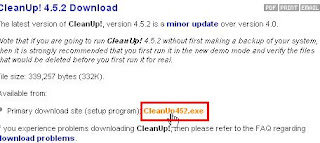
After you download and install CleanUp!, your first run of CleanUp! will throw up this message:

If you click yes, CleanUp! will scan, show you results, and won't delete anything. If you click no, a normal scan will be conducted and will delete all junk files it finds. Be sure to close all your browser windows before you start your scan otherwise you'll see this window:

love the flush! if you'd like to turn that off scroll to the bottom of this section. At the end of the scan your results will be shown in the main CleanUp! Window:

I recommend a quick scroll through the list of deleted items to see what CleanUp! deleted from your system. Its good to have a rough idea where these files may be nestled in the event you'd like to perform a manual removal of these junk files. If you ran CleanUp! in Demonstration Mode, close cleanup and open it back up again to run it in normal mode.
Disable the loud Flush. In the Cleanup main window click the options button. Then uncheck the check box shown here:

Avast Antivirus
Avast Antivirus will be covered in part 2 of this entry. Virus detection and removal offers a few extra challenges and I think I've addressed a nice chunk of info already. In my next post I'll explain some of the key features you'll want to look for in anti-virus software and how to use those features to your advantage.
Hope this helps! Happy cleaning!
A big thanks to uncle Rob for his years of guidance!
If you'd like more information on virus' and how they work, click on one of the links below:
What is Malware?
What is a virus?
What is spyware?
Before we begin I'd like to clarify that there is no substitute for a trained technician. If you are in danger of losing your data, I recommend you seek professional assistance.
If you own a PC you've probably encountered a virus. At this very moment there is undoubtedly spyware sitting somewhere in your computer. While you struggle protecting yourself from unwanted programs, Mac users will boast how proud they are that Mac's never get infected. All the while, you shell out hundreds of dollars a year taking your computer into a shop to clean out all the junk you've piled on to your system. Frustrating to say the least.
At the end of my 2 part guide you will be able to perform your own system maintenance and dramatically increase the health of your computer. I'll cover methods of freeing up your hard drive space, protecting your browser from spyware, and keeping your computer safe from infection.
I would estimate you can eliminate 60% of unwanted software by following these guidelines:
- Avoid being "click-happy" while web browsing. Closely examine what you are clicking and decide if it is explicitly where you want to go. Practice a healthy sense of caution.
- Use an ad-blocker. A number 1 source of Malware and Spyware are ads that claim they are legitimate products or services. If you receive a pop-up, study it carefully. It will usually contain a "close" or "cancel" button. If it is a window, DO NOT click anywhere in the ad simply close the window by clicking the "X" in the top right of the window.
- Don't respond to fake messages on Porn sites. Embarrassing but true. Majority of computers I've worked on have gotten infected because of reckless porn browsing. If you've taken your computer in because of reckless browsing, a trained technician can spot your browsing habits a mile away.
Curiosity kills both cats and your computer!
Now that we've covered some basic habits to prevent infection, lets take a look at building up a good set of tools to perform some regular maintenance. A weekly clean for you will consist of the following:
Doing a weekly scan with these programs will save you a heap of headache and money. Spybot and MalwareBytes will provide you a solid set of Malware and Spyware detection services. Cleanup! performs extensive system cleaning of your temporary file directories that eat up drive space over time. Avast anti-virus is an excellent, completely free, anti-virus program. Avast has added a few really nice features recently that sold me on their freeware version.
MalwareBytes Anti-Malware
Open your web-browser and go to www.malwarebytes.org and click the "download free version" link then install MalwareBytes on your system. Perform an update of MalwareBytes before scanning your system. Doing this will ensure Malwarebytes is scanning with the latest malware database :

To perform a full system scan:
-From the Scanner section, click on the "Perform full scan" toggle
-Click the scan button below:

If MalwareBytes finds any infected objects:
-Click the "Show Results" button in the bottom right of the window.
-From the results window, click "Delete All".
Some items aren't always deleted right away so you may be asked to restart your computer to complete the cleaning.
Spybot S&D
Go to www.safer-networking.org and download Spybot S&D. During the installation process you will be asked if you would like to perform a software update of spybot. Clicking "yes" will bring up the window shown below:

The list shown above is a list of updates. Be sure to update all the items titled "detection rules" and click "Download". After the download completes, Spybot should start normally.
Next, were going to enable a very important area of spybot called "Immunize". This will protect your browser from nearly 200,000 types of unwanted programs. To access this feature, click the "immunize" button in the left section of Spybot's main menu:

In the immunize page, take notice of the top right of the page:

The top right of this window will show you the anti-spyware it is aware of and actively protecting against (Protected), the files yet to be loaded (unprotected), and the Total files spybot has at its disposal:

To load all entries, click Immunize:

Once completed, your browser will be loaded will Spybot's immunization database.
Now your ready to perform your first scan. Spybot's web site has some very well written resources if you'd like a guided walkthrough of performing your first scan, visit Safer Networking for additional info on scans and how to interpret scan results with Spybot.
CleanUp!
CleanUp! is a great free program that will clean windows of temporary files. Temporary files are created in many different ways as you make changes to your computer and run software. Over a period of 1 month an average computer can accumulate roughly 500mb of temporary files or "Junk" files. After 6 months you could easily find yourself with a large portion of disk space vanishing into thin air. You can avoid losing out on precious hard drive space with this free program.
The interface may not look like much but it is very effective at cleaning your hard drive:

Click this link to Stevegould.org to download CleanUp!. Before downloading this program take a second to read this introduction then scroll to the bottom of the page and click "next". Next, click the link shown here:

After you download and install CleanUp!, your first run of CleanUp! will throw up this message:

If you click yes, CleanUp! will scan, show you results, and won't delete anything. If you click no, a normal scan will be conducted and will delete all junk files it finds. Be sure to close all your browser windows before you start your scan otherwise you'll see this window:

love the flush! if you'd like to turn that off scroll to the bottom of this section. At the end of the scan your results will be shown in the main CleanUp! Window:

I recommend a quick scroll through the list of deleted items to see what CleanUp! deleted from your system. Its good to have a rough idea where these files may be nestled in the event you'd like to perform a manual removal of these junk files. If you ran CleanUp! in Demonstration Mode, close cleanup and open it back up again to run it in normal mode.
Disable the loud Flush. In the Cleanup main window click the options button. Then uncheck the check box shown here:

Avast Antivirus
Avast Antivirus will be covered in part 2 of this entry. Virus detection and removal offers a few extra challenges and I think I've addressed a nice chunk of info already. In my next post I'll explain some of the key features you'll want to look for in anti-virus software and how to use those features to your advantage.
Hope this helps! Happy cleaning!
A big thanks to uncle Rob for his years of guidance!
Subscribe to:
Posts (Atom)
